
Last week, I worked on the first prototype of Redact — a macOS app that prevents developers from accidentally pasting secrets into ChatGPT, Slack, or any external service.
The concept is simple:
– intercept the clipboard
– run it through a local AI
– block if sensitive
This post documents the engineering challenges I faced and how I solved them using Swift, Apple’s MLX framework, and a lot of trial and error.
The Architecture
Redact is built as a native macOS app with three core components:
- ClipboardMonitor — Watches NSPasteboard for changes
- MLXManager — Loads and runs the on-device LLM
- PasteInterceptor — Blocks paste events when sensitive data is detected
The key constraint: Everything runs locally so no cloud and no network calls because of privacy.
Challenge #1: The 4.5GB Monster
I started with Llama 3.2 3B (4-bit quantized) via MLX framework. It’s accurate, fast on Apple Silicon, and runs entirely on-device.
I started with Llama 3.2 3B (4-bit quantized) using MLX but when I opened Activity Monitor, I saw this:
Process: Redact, Memory: 4.53 GB
That’s insane for a background utility. Developers need that RAM for Xcode, Docker, and their 47 Chrome tabs. Nobody is going to sacrifice 4GB for a clipboard tool, no matter how useful it is.I had three options:
| Option | Pros | Cons |
|---|---|---|
| Cloud inference | Low memory | Breaks the privacy promise |
| Regex patterns | Fast, tiny | Too many false positives, no context |
| Smaller model | Still AI-powered | Might be less accurate |
I went with option 3.
Challenge #2: The Download Bug That Wasted Hours
Before I could even test smaller models, I ran into a frustrating bug. The model download would finish (1.8GB transferred), then immediately fail:Error Domain=NSCocoaErrorDomain Code=4
"CFNetworkDownload_ATSEZe.tmp" couldn't be moved to "llama-3.2-3B-Instruct-4bit"
I spent way too long debugging this.
Turns out, when you use URLSessionDownloadDelegate, the system gives you a temporary file in the didFinishDownloadingTo callback. But here’s the interesting part: that temp file gets deleted the moment the callback returns. I was trying to move the file after the callback finished, but by then it was already gone. To fix this: You have to move the file immediately, inside the callback itself:
func urlSession(_ session: URLSession,
                downloadTask: URLSessionDownloadTask,
                didFinishDownloadingTo location: URL) {
    do {
        // Move it NOW - the temp file disappears after this callback
        if FileManager.default.fileExists(atPath: destinationURL.path) {
            try FileManager.default.removeItem(at: destinationURL)
        }
        try FileManager.default.moveItem(at: location, to: destinationURL)
        completion?.resume(returning: destinationURL)
    } catch {
        completion?.resume(throwing: error)
    }
}
Challenge #3: Choosing the Right “Small” Model
I looked at two approaches:
Option A: Classification Models (BERT-tiny, DistilBERT)
- Size: 20-100 MB
- Speed: <50ms inference
- Problem: These models need to be fine-tuned on labeled data. I’d need thousands of examples of “sensitive” vs “safe” code snippets. I didn’t have that dataset, and I didn’t want to build one.
Option B: Quantized LLaMA 1B
- Size: ~600 MB
- Speed: ~100ms inference
- Advantage: You can just give it instructions in plain English. No training data needed.
I went with Llama 3.2 1B (4-bit quantized). Here’s the thing: I don’t need the model to write poetry or explain quantum physics. I just need it to tell the difference between:
const apiKey = "sk_live_51Mz9jL..."  // SENSITIVE - actual key
const apiKey = process.env.STRIPE_KEY  // SAFE - just a reference
A 1B model with good prompting handles this perfectly.
Challenge #4: The Auto-Unload Timer That Never Worked
My first idea was to unload the model from memory after 30 seconds of inactivity. That way, the app would only use RAM when actively protecting the clipboard.
I set up a timer:
private var unloadTimer: Task<Void, Never>?
private let modelUnloadDelay: TimeInterval = 30.0

func scheduleModelUnload() {
    unloadTimer?.cancel()
    unloadTimer = Task { @MainActor in
        try? await Task.sleep(nanoseconds: UInt64(modelUnloadDelay * 1_000_000_000))
        guard !Task.isCancelled else { return }
        await unloadModelImmediately()
    }
}
I tried shortening the delay to 5 seconds. Still didn’t work reliably because of how often the clipboard gets polled. Once I switched to the 1B model and saw it only uses ~600-800MB, I just scrapped the whole auto-unload idea. The memory usage is fine now. Users get instant responses without any loading delay.
Challenge #5: The Prompt That Made It Smart
The 1B model is smaller and less capable than the 3B. So the prompt matters a lot more. My first attempt was too vague:
// Too generic - model got confused
let systemPrompt = "You are a security classifier. Reply SAFE or SENSITIVE."
The model would flag random stuff and miss obvious secrets. I had to be way more specific:
// Much better - tells the model exactly what to look for
let systemPrompt = """
You are a code security classifier for developers. Detect sensitive data in code.

SENSITIVE (flag these):
- API keys/tokens: Stripe, AWS, GitHub, OpenAI, etc.
- Passwords: hardcoded passwords, auth tokens
- Private keys: SSH keys, certificates, encryption keys
- Secrets: OAuth secrets, JWT secrets, encryption keys
- Database credentials: connection strings, DB passwords
- Internal endpoints: private URLs, internal IPs, staging servers

SAFE (allow these):
- Example/placeholder values (e.g., "your-api-key-here", "example.com")
- Environment variable references (e.g., process.env.API_KEY)
- Public APIs and documentation
- Code comments explaining security (without actual secrets)

Reply with ONLY one word: SAFE or SENSITIVE.
"""
This made a huge difference.
The model now understands that process.env.API_KEY is safe because it’s just a reference, while “sk_live_51Mz9jL…” is sensitive because it’s an actual Stripe key.
The final architecture
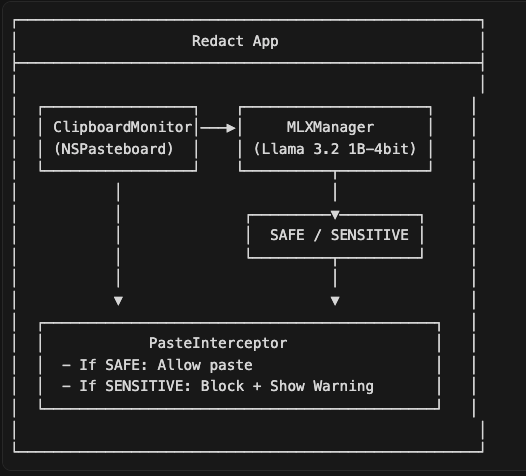
Key Libraries:
- MLX Swift (github.com/ml-explore/mlx-swift)
- MLXLLM — Swift package for running LLMs locally
- MLXLMCommon — Utilities for language models
- SwiftUI — Native macOS UI
- NSPasteboard — System clipboard access

 Adriatik's Blog
Leave a comment